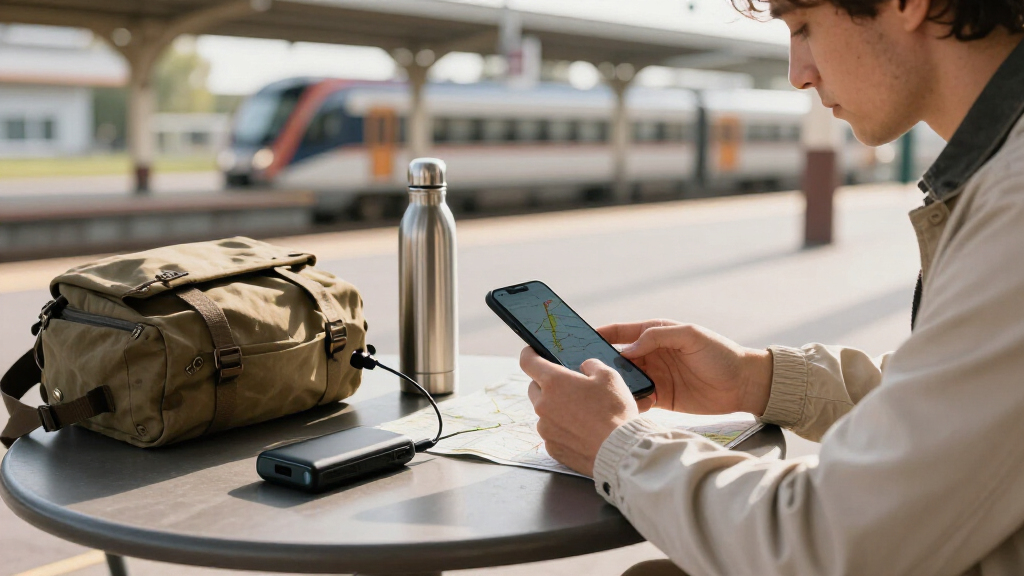
Choose a power bank for your devices, check whether it can travel in your carry-on, and prepare it for safe use on a trip. This guide is for travelers who want a reliable way to recharge a phone, tablet, earbuds, or other small devices without relying on a wall outlet. No technical experience is needed. Allow 20–30 minutes to check your equipment and pack the battery.

Get travel and outdoor gear delivered free — and shop member deals
- Fast, free delivery on millions of items
- Access to Prime Big Deal Days deals on October 6–7
- Prime Video, Amazon Music and more included

INIU 10,000mAh 45W Fast-Charging Portable Charger
- ✔ Battery capacity: 10,000mAh
- ✔ Maximum output: 45W
- ✔ Ports: 2 USB-C, 1 USB-A

HELLEE 15,000mAh Portable Charger with 4 Built-In Cables
- ✔ Battery capacity: 15,000mAh
- ✔ Built-in cables: USB-A, USB-C, iOS, Micro
- ✔ Number of outputs: 6

Miady 2-Pack 10000mAh Slim Portable Charger
- ✔ Battery capacity: 10,000mAh each
- ✔ Included chargers: 2
- ✔ Ports: 4 total; USB-A and USB-C
Difficulty: Beginner | Time: 20–30 minutes to choose and prepare
What You’ll Need
Tools & Materials:
- Your devices and their charging cables
- The power bank’s label or product specifications
- Your airline’s current battery and carry-on rules
Knowledge:
- How to identify your device’s charging connector
- How to find the battery capacity and output specifications on a power bank
Check rules for every airline on your itinerary, including connecting carriers. Battery limits and procedures can vary by airline and route. Power banks contain lithium batteries and generally must travel in carry-on baggage, not checked baggage.
INIU 10,000mAh 45W Fast-Charging Portable Charger
For a trip where a phone and tablet need a quick top-up without a large battery pack, INIU’s stated 45W maximum output gives it the clearest performance advantage in this lineup. It has two USB-C ports and one USB-A port, so we can carry one charger for a small mix of devices rather than choosing between newer USB-C gear and an older USB-A accessory. Its 10,000mAh capacity keeps the unit in the compact-backup category, not the all-weekend-without-an-outlet category.The detachable braided USB-C cable is useful because it is replaceable, and the airline-safe capacity is explicitly called out in the description. But at just 0.4 feet long, the included cable may feel awkward when a device is in use while charging. HELLEE includes more cable types and more capacity, while INIU puts the emphasis on higher stated output and a conventional port mix. That makes INIU our most balanced pick for a traveler who packs their own preferred cable and values charging speed over maximum reserve power.
Pros:
- 45W maximum output is the highest stated output among these picks
- Two USB-C ports and one USB-A port support a mix of devices
- Compact 10,000mAh capacity is described as airline-safe
- Detachable braided USB-C cable can be replaced
Cons:
- The included cable is only 0.4 feet long
- 10,000mAh may be limiting when several devices need repeated recharging
Best for: Travelers who want a compact, higher-output backup for USB-C phones or tablets and a mix of USB-C and USB-A devices.
Not ideal for: People who need enough capacity for repeated charging across several days, or who want long included cables ready to use.
Bottom line: Choose INIU for the best balance of compact travel size, port flexibility, and the lineup’s highest stated charging output.
“Choose INIU for the best balance of compact travel size, port flexibility, and the lineup’s highest stated charging output.”
HELLEE 15,000mAh Portable Charger with 4 Built-In Cables
HELLEE is the simplest option to grab when we want to leave loose charging cables at home. Its four built-in cable types—USB-A, USB-C, iOS, and Micro—cover a broader range of connectors than INIU’s included USB-C cable, and the stated 15,000mAh capacity exceeds either Miady unit. For a shared trip or a bag with several devices, its six outputs also promise more connection options than the three-port INIU.That convenience comes with a meaningful tradeoff: HELLEE’s stated maximum output is 22.5W, half of INIU’s 45W figure. The digital display and stated three-hour recharge time are useful planning details, but the provided information does not verify how the charger performs under simultaneous multi-device use. Compared with Miady, HELLEE combines a larger single-unit capacity with integrated cable options; compared with INIU, it favors fewer loose accessories over higher output. We would choose it for connector variety and ease of packing, while buyers prioritizing faster USB-C charging should look first at INIU.
Pros:
- 15,000mAh capacity is larger than either individual charger in the lineup
- Four built-in cable types reduce loose accessories
- Six outputs support multiple connected devices
- Digital display and stated three-hour recharge time aid trip planning
Cons:
- 22.5W maximum output is below INIU’s stated 45W
- Available product information does not establish real-world performance
Best for: Travelers carrying devices with different connector types who want built-in cables and a larger single-unit capacity.
Not ideal for: Buyers prioritizing the highest stated output, or those who prefer to use their own replaceable cables.
Bottom line: Pick HELLEE when integrated cables and more single-unit capacity matter more than leading output speed.
“Pick HELLEE when integrated cables and more single-unit capacity matter more than leading output speed.”
Miady 2-Pack 10000mAh Slim Portable Charger
Miady’s main travel advantage is the bundle: two separate 10,000mAh chargers let us keep one in a day bag and one in luggage, or hand the second to a travel companion. Each unit is slim and listed at 7.68 ounces, and the package includes two USB-C cables. That split-battery setup can be more convenient than sharing HELLEE’s single 15,000mAh pack when people are sightseeing separately.The compromise is that Miady’s description lists a 2.4A output current but does not state a maximum wattage, so we cannot compare its charging speed directly with INIU’s 45W or HELLEE’s 22.5W. Its USB-C ports work as both input and output, and the listing says the pair can charge up to three devices at once. However, a Lightning cable is not included, and the laptop compatibility claim lacks the output details needed to judge laptop charging. Compared with INIU, Miady offers a second unit rather than a higher specified output; compared with HELLEE, it is easier to distribute but requires us to bring any connector cables not supplied.
Pros:
- Two separate 10,000mAh chargers can be shared or packed separately
- Slim design and 7.68-ounce listed weight per unit
- Bidirectional USB-C supports charging the bank and connected devices
- Two USB-C cables are included
Cons:
- Lightning cable is not included
- Laptop compatibility is listed without charging output details
- Maximum output wattage is not specified
Best for: Two travelers, or one traveler who wants separate backup chargers for different bags and outings.
Not ideal for: Buyers who need a clearly specified fast-charge output, a built-in Lightning cable, or verified laptop charging.
Bottom line: Choose the Miady pair when distributing backup power matters more than a clearly documented fast-charge rate.
“Choose the Miady pair when distributing backup power matters more than a clearly documented fast-charge rate.”
As an Amazon Associate we earn from qualifying purchases.
Before You Start
Keep the power bank accessible in your cabin baggage. Do not pack it in checked luggage. If staff require you to check a carry-on bag at the gate, remove the power bank first. Look up the airline’s current limits for lithium batteries, including watt-hour (Wh) ratings and any approval requirements. If the capacity is shown only in milliamp-hours (mAh), use the maker’s Wh rating when available; do not guess if the label is unclear.
Step-by-Step Instructions
Step 1: List the devices you need to charge
Write down each device you expect to recharge, such as a phone, tablet, earbuds, camera, or handheld game console. Check which connector each device uses and whether you need to charge more than one device at the same time. Include a cable for each connector type.
Tip:A power bank with several ports may share its total output among them, so multiple ports do not always mean faster simultaneous charging.
Check: You have a short device list and know which cables and ports your trip requires.
Step 2: Check the power bank’s capacity and airline limits
Find the power bank’s capacity and, if listed, its watt-hour rating on the label or manufacturer’s product page. Compare the Wh rating with the limits published by every airline you will fly. Follow any requirements for approval, quantity, or carrying the battery in a particular way. If the rating is missing or unreadable, ask the manufacturer or airline before traveling.
Tip:Capacity in mAh alone does not tell you whether a battery meets an airline’s Wh limit, because the voltage matters. Use the stated Wh figure when available. If you need to calculate it, use the manufacturer’s voltage and formula: Wh = (mAh × volts) ÷ 1,000.
Check: You can confirm the battery rating and have checked it against the rules for each airline on your itinerary.
Step 3: Match the output to your devices
Check the power bank’s output specifications and compare them with the charging requirements for your devices. Match the connector and supported charging standard, such as USB-C Power Delivery, when your device requires one for faster charging. For everyday phone charging, a compatible standard USB output may be enough; larger devices may need higher output or may not charge from a small bank at all.
Tip:A device generally draws only the power it supports, but an incompatible port or cable can prevent charging or reduce charging speed. Use the device maker’s guidance if you are unsure.
Check: The bank has a compatible port and sufficient supported output for the devices you plan to charge.
Step 4: Estimate how much capacity you need
Choose capacity based on how long you will be away from outlets and how many times you expect to recharge your devices. Use the manufacturer’s estimated device charges as a rough guide, then allow for energy loss during conversion and charging. A larger capacity adds weight and may face stricter airline limits, so choose the smallest bank that covers your expected needs.
Tip:Phone battery capacity and power bank capacity are measured under different conditions. Do not expect a bank advertised as a certain number of mAh to deliver that many mAh to your phone.
Check: Your choice balances the number of expected charges with weight and the applicable airline restrictions.
Step 5: Inspect the bank, ports, and cables
Before packing, inspect the power bank for swelling, cracks, unusual heat, leaks, or damaged ports. Check that the cable ends are intact and that the connectors fit securely. Do not travel with a bank that is damaged, unusually hot, or behaving abnormally; follow the maker’s advice for safe handling and replacement.
Tip:Keep loose metal objects, such as keys and coins, away from exposed ports to reduce the chance of a short circuit.
Check: The bank and cables appear intact, with no signs of damage or abnormal behavior.
Step 6: Charge the power bank before departure
Connect the bank to a suitable charger using the maker’s recommended cable and input port. Leave it charging until its indicators show the level you want for the trip, then disconnect it. If the bank is new, follow its instructions; it usually does not need repeated full discharge cycles unless the manufacturer says otherwise.
Tip:Charging speed depends on the bank, charger, cable, and outlet. Allow extra time if the bank has a large capacity or does not support fast input charging.
Check: The indicators show a useful charge level, and the bank is not unusually hot or showing an error.
Step 7: Pack it in your carry-on
Place the power bank in your cabin bag, where you can reach it if airline staff ask to inspect it or if your bag must be checked at the gate. Protect it from crushing and keep its ports from contacting metal items. Follow any airline instruction to protect terminals or store batteries separately.
Tip:Do not place the power bank in checked baggage, even inside a suitcase that you plan to check at the counter.
Check: The bank is in carry-on baggage, protected from damage, and easy to remove if needed.
Step 8: Test a charge before you rely on it
Connect one of your devices with the cable you plan to bring. Press the power button if the bank requires it, then confirm the device shows that it is charging. If you will use several ports, check the manual for their combined output and test your intended setup at home.
Tip:Some banks stop supplying power when the connected device draws very little current. Check the instructions for a low-current mode if earbuds or a small accessory will not stay charging.
Check: Your device displays a charging indicator, and the bank’s lights or screen show power is being delivered.
Common Mistakes to Avoid
- Packing the power bank in checked baggage. — Pack it in carry-on baggage and remove it before handing a carry-on bag over for gate checking.
- Choosing by mAh alone without checking the airline’s Wh limit. — Read the Wh rating on the product label or manufacturer’s specifications and compare it with each airline’s current rules.
- Assuming every port supports fast charging or works with every device. — Check port output, charging standards, and cable compatibility against your devices before buying or departing.
- Expecting the advertised capacity to equal the charge delivered to a device. — Plan for conversion losses and use the maker’s estimated device charges as a practical guide.
Troubleshooting
Problem: The airline’s rules are unclear or the power bank’s rating is hard to read.
Solution: Check the airline’s battery guidance and contact the carrier with the model number and product specifications. If you cannot verify that the battery is allowed, do not bring it on that flight.
Problem: The connected device does not show that it is charging.
Solution: Check the bank’s charge level, press its activation button if needed, reconnect both cable ends, and try a compatible port and cable. Consult the manuals if the problem continues.
Problem: The power bank stops charging earbuds or another small accessory.
Solution: Check whether the bank has a low-current or trickle-charge mode and enable it as instructed. Turn the mode off after use if the maker recommends doing so.
Problem: The bank becomes unusually hot, swells, or shows physical damage.
Solution: Stop using or charging it. Keep it away from flammable materials if you can do so safely, and follow the manufacturer’s or local battery-disposal guidance. Do not pack a damaged battery for air travel.
What Success Looks Like
You are ready to travel when the power bank is undamaged, compatible with your devices, charged to a useful level, and packed in accessible carry-on baggage. You have checked the labeled capacity against every airline’s current rules, and a home test shows that at least one planned device charges correctly.
Next Steps
During the trip, recharge the bank when you have access to a suitable outlet and keep it protected from heat, crushing, and moisture. Check airline instructions again before future flights because rules can change. Replace the bank if it becomes damaged or no longer works reliably, and dispose of it through an approved battery collection point rather than household trash.
Frequently Asked Questions
Can I pack a power bank in checked luggage?
Power banks generally must be carried in cabin baggage. Keep yours out of checked luggage, and remove it if your carry-on bag is checked at the gate.
How do I tell whether my power bank is allowed on my flight?
Read the battery’s Wh rating and compare it with the current rules from each airline on your itinerary. Check for approval or quantity requirements, and contact the airline if the label or policy is unclear.
How many times will a power bank charge my phone?
It depends on the bank’s usable capacity, the phone’s battery size, and charging losses. Use the manufacturer’s estimate as a guide and plan for fewer charges than a simple mAh comparison suggests.
Can I charge my phone and earbuds at the same time?
Only if the bank supports simultaneous output on those ports. Check its manual for combined output limits; charging multiple devices may reduce speed.
Should I fully charge a power bank before a flight?
A useful charge level helps you start the trip prepared, but a full charge is not generally required for air travel. Follow the manufacturer’s charging instructions and check that the bank is not unusually hot or damaged before packing.
Fall Picks
fall essentials
As an affiliate, we earn on qualifying purchases.